Close All Group Folios
Stay is enhanced to allow users to close all folios of a group and delay the automatic closure of folios.
Feature Setting
The Close Folios feature setting must be enabled to use this feature.
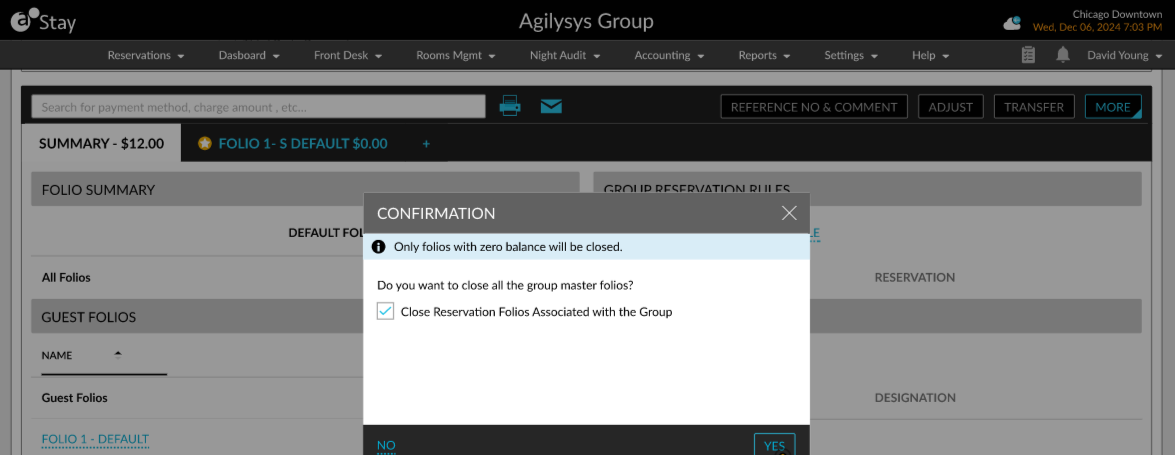
To support this enhancement, a new option, Close All Folios, has been added to the More menu in the Folio & Routing Rules tab of groups (Group ➜ Folio & Routing Rules tab ➜ Folios section ➜ More). This option will be enabled for selection only when the departure date of the group falls on the current property date.
When clicked, a Confirmation pop-up screen appears that displays the following message: Do you want to close all the group master folios? The information message, Only folios with zero balance will be closed, is displayed as a banner in the screen. Additionally, a checkbox, Close Reservation Folios Associated with the Group, is available on the pop-up screen.
The group folios are closed based on the following conditions:
-
When users click Yes in the Confirmation pop-up screen, and the Close Reservation Folios Associated with the Group checkbox is not selected:
-
The non-default group folios are closed when the folio balance is $0.00. The non-default folios can be closed prior to the departure of the reservation once the folio balance becomes $0.00.
-
The default folio will be closed only when the following conditions are satisfied:
-
The status of the group must be Departed/Canceled/Turned Down/No Show.
-
The folio balance must be $0.00.
-
All reservations associated with the group must be in the Departed/Canceled/No Show statuses.
-
-
When the conditions mentioned are not satisfied, only the folios that satisfy the conditions are closed. The remaining folios are left open.
-
When users click Yes in the Confirmation pop-up screen, and the Close Reservation Folios Associated with the Group checkbox is selected:
-
The previously mentioned conditions are checked to close the group folios and the following conditions are checked additionally to close the group reservation:
-
The non-default folios are closed when the folio balance is $0.00.
-
The default folio is closed only when the folio balance is $0.00.
-
The reservation status must be Departed/Canceled/No Show.
-
-
When the conditions mentioned are not satisfied, only the folios that satisfy the conditions are closed. The remaining folios are left open.
Delay Automatic Closure of Folios
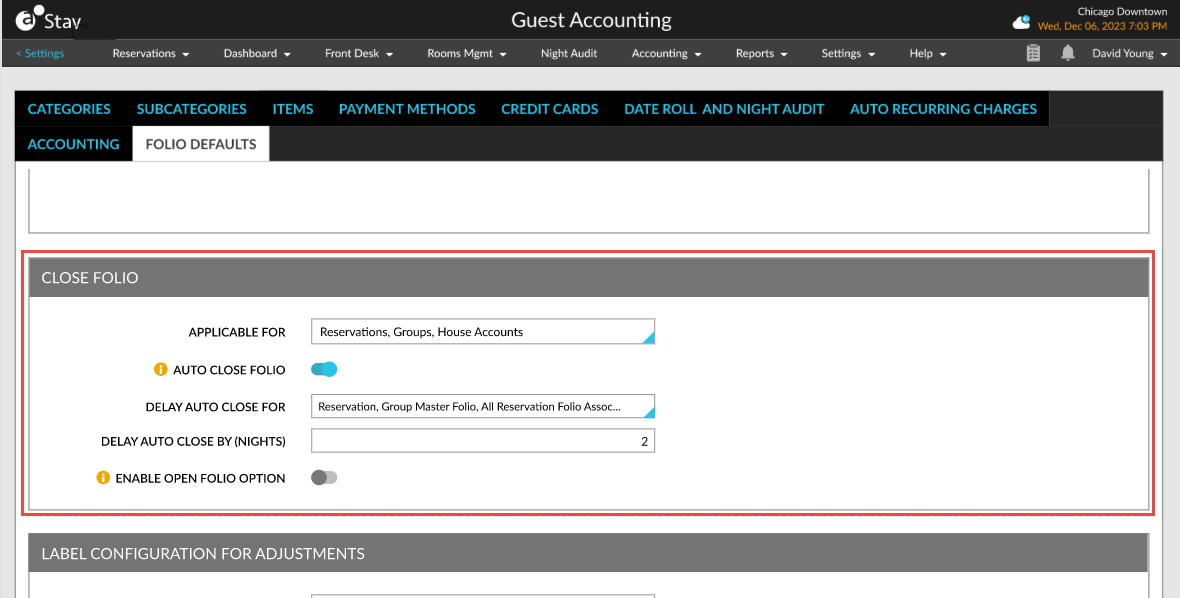
When the Auto Close Folio option is enabled for a group, users will now have the option to delay the automatic closure of folios. To achieve this, users can configure which folios and by how many nights the delay in closure must take place.
For example, if the value of the Delay Auto Close By (Nights) field is set as 2 and when a reservation is checked out on December 10, 2024, the reservation folios will be closed automatically on December 12, 2024, when the conditions mentioned are satisfied.
The following new options have been added to the Close Folio section in the Folio Defaults tab of the Guest Accounting screen.
|
Field |
Description |
|---|---|
|
Delay Auto Close For |
This is an optional multi-select drop-down list that displays the following options:
|
|
Delay Auto Close By (Nights) |
The number of nights to delay the automatic closure of folios. By default, the value is set as 1. Users can set any value between 1 and 30. |